Weblorium

Case Study

AromaCDF

A spa and wellness booking platform built to capture more appointments, reduce scheduling friction, and improve day-to-day control

AromaCDF helps a spa or wellness business turn more visitor demand into confirmed appointments by replacing manual back-and-forth with a guided booking flow, qualification-aware scheduling, self-service booking management, and one operations dashboard for staff, services, and reporting.

Capture more appointment demand with a guided booking journey that reduces drop-off and supports multi-service visits

Reduce scheduling mistakes with qualification-aware availability that accounts for hours, time off, breaks, and existing bookings

Improve operational decisions with one admin workspace for booking control, staff management, and performance reporting

Overview

What this system had to solve before it could work at scale

The business problem was familiar: too much booking friction, too much manual coordination, and too little visibility into what was actually happening across appointments, staff time, cancellations, and revenue. AromaCDF solves that by combining a public booking journey with a protected administrative workspace, so customers can book and manage appointments without creating accounts while the business controls staff, services, schedules, availability, statuses, and performance analytics from one system.

Capture more appointment demand with a guided booking journey that reduces drop-off and supports multi-service visits

Reduce scheduling mistakes with qualification-aware availability that accounts for hours, time off, breaks, and existing bookings

Improve operational decisions with one admin workspace for booking control, staff management, and performance reporting

Focus Areas

The platform below is broken into the core operational and commercial layers it had to get right.

Swipe or scroll

Focus 01

Turn More Interest Into Confirmed Bookings

The public booking flow is designed to remove the friction that causes service businesses to lose customers before confirmation.

Focus 02

Stop Losing Time to Manual Scheduling Conflicts

Availability is calculated against real operating rules instead of exposing a misleading static calendar.

Focus 03

Give Customers Control Without More Admin Work

Customers can retrieve and manage bookings on their own instead of sending staff back into repetitive support tasks.

Focus 04

Run Daily Operations From One Control Layer

The protected workspace gives administrators one place to manage the moving parts that usually get scattered across messages, spreadsheets, and memory.

Focus 05

Use Reporting to Improve Revenue and Staffing Decisions

The system preserves operational accuracy so the business can trust its reporting and act on it.

01

Turn More Interest Into Confirmed Bookings

The public booking flow is designed to remove the friction that causes service businesses to lose customers before confirmation.

Guide visitors through service selection, staff choice, date and time, customer details, and confirmation without forcing a phone call
Support multi-service bookings inside a single appointment so customers do not abandon the flow when they need more than one treatment
Return a reference code and direct management link at confirmation for lookup, confidence, and operational tracking

02

Stop Losing Time to Manual Scheduling Conflicts

Availability is calculated against real operating rules instead of exposing a misleading static calendar.

Generate bookable slots in 15-minute intervals based on total appointment duration
Use weekly working hours, future time off, blocked breaks or holidays, and existing bookings to decide availability automatically
Keep staff selection tied to service qualification so treatments are only assigned to eligible team members and operational errors are reduced

03

Give Customers Control Without More Admin Work

Customers can retrieve and manage bookings on their own instead of sending staff back into repetitive support tasks.

Find appointments using reference code plus email or via token-based management links
Review booking details including services, time, staff, status, and saved appointment notes
Allow cancellation when the appointment state still permits it without exposing the admin workspace or adding manual intervention

04

Run Daily Operations From One Control Layer

The protected workspace gives administrators one place to manage the moving parts that usually get scattered across messages, spreadsheets, and memory.

Show dashboard metrics such as today’s appointments, weekly bookings, weekly revenue, active staff, active services, and today’s schedule
Manage services, staff profiles, staff-to-service qualification mapping, weekly hours, and future time-off entries
Search bookings, filter by status, inspect appointment detail, and move records through PENDING, CONFIRMED, COMPLETED, CANCELLED, and NO_SHOW from one workspace

05

Use Reporting to Improve Revenue and Staffing Decisions

The system preserves operational accuracy so the business can trust its reporting and act on it.

Report on total appointments, revenue, completed bookings, cancellations, no-shows, top services, and staff performance across date ranges
Snapshot appointment value at booking time so historical reporting stays stable even if service pricing changes later
Soft-deactivate staff and services, and release cancelled or no-show slots back into future availability without losing commercial history

Screens

Key customer and admin screens from the live booking system

These selected surfaces show how AromaCDF removes booking friction for customers while giving the spa one operational layer for appointments, availability control, and daily decision-making.

Swipe or scroll
AromaCDF service selection screen

Booking Flow

Five-step customer booking journey

The public flow guides customers from service selection into a structured booking journey instead of pushing them into calls or manual message coordination.

AromaCDF date and time selection screen

Availability

Qualification-aware slot selection

Bookable time slots are generated from real availability rules, so visitors only see times that match staff qualification, schedule windows, and existing bookings.

AromaCDF booking management screen

Customer Management

Reference lookup and cancellation flow

After confirmation, customers can reopen their booking, review the appointment details, and cancel when the booking state still allows it.

AromaCDF admin dashboard

Admin Dashboard

Operations dashboard and booking pipeline

The protected workspace gives the business one live view of bookings, revenue, team activity, status distribution, and the day’s schedule.

Customer Journey

The full booking flow built to reduce drop-off

These screens show the exact public journey from choosing a service to getting a confirmed appointment and a self-service management link.

Swipe or scroll
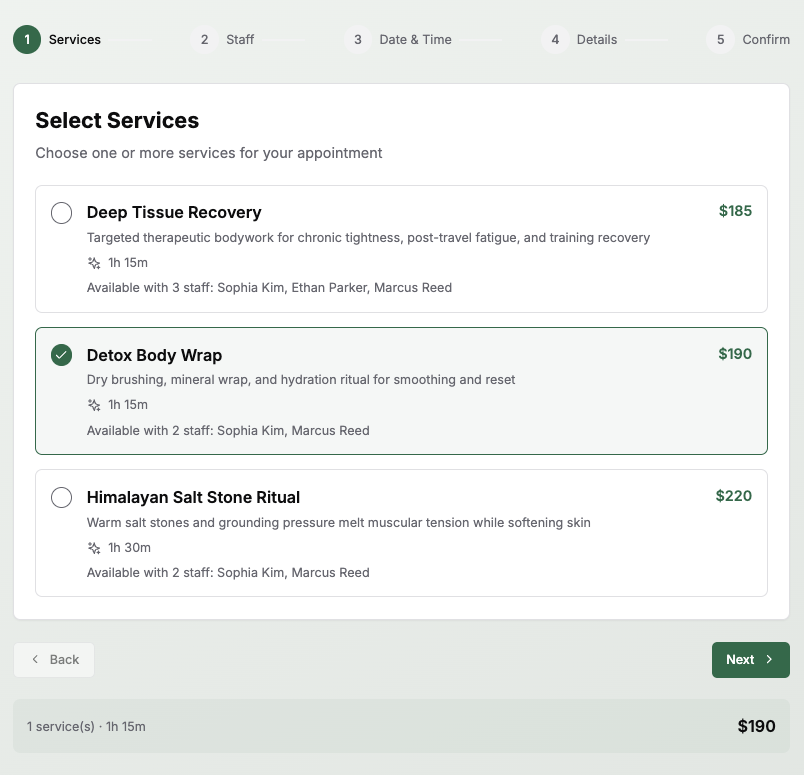
AromaCDF service selection step

Step 1: Select services

Customers start by selecting one or more treatments, with pricing, duration, and qualified staff surfaced immediately.

AromaCDF staff selection step

Step 2: Choose qualified staff

Only eligible team members are shown for the chosen service set, which keeps the booking flow realistic and operationally safe.

AromaCDF date and time step

Step 3: Pick date and time

The date-and-time step exposes bookable slots instead of forcing customers to request availability manually.

AromaCDF customer details step

Step 4: Enter customer details

Contact details and special requests are captured directly in the flow so the business receives complete appointment context at booking time.

AromaCDF booking confirmation review step

Step 5: Review and confirm

The final review screen reduces mistakes by letting visitors verify service, staff, time, and personal details before submission.

AromaCDF booking confirmed screen

Confirmation with reference code

A confirmed booking generates a reference code and a direct management entry point, which builds trust and reduces follow-up support load.

AromaCDF booking management detail screen

Self-service booking management

Customers can reopen a booking later to review appointment details and cancel if the appointment state still allows it.

Admin Workspace

The back-office layer that keeps operations under control

The protected admin environment brings bookings, services, staff setup, and reporting into one system instead of splitting the business across spreadsheets, calls, and disconnected tools.

Swipe or scroll
AromaCDF admin dashboard screen

Live operations dashboard

Management gets an immediate view of booked volume, revenue, status pipeline, team activity, and the day’s schedule from one screen.

AromaCDF appointments management screen

Central appointment queue

Bookings can be searched, filtered by status, and reviewed from one operational list instead of being tracked manually.

AromaCDF services management screen

Service catalog management

Services stay organized with pricing, duration, and assigned staff visible in one place for faster day-to-day updates.

AromaCDF add service screen

Structured service creation

New services can be created with the exact commercial and operational fields the team needs, including duration, price, and staff assignment.

AromaCDF staff management screen

Staff management overview

The team can review therapists, activity status, contact details, and service coverage without leaving the admin workspace.

AromaCDF add staff screen

Staff setup and qualification mapping

New staff records can be created with the service assignments that power the qualification-aware booking logic on the public side.

AromaCDF reporting screen

Reporting and team performance

Date-range analytics expose completed bookings, revenue, top services, no-shows, and staff performance for better staffing and revenue decisions.

Next Step

Use this as the foundation for more case studies

The route is dynamic, so future client pages can reuse the same structure and only swap the content entry. AromaCDF now lives in that shared system.

WhatsApp Us

Talk to the founder

Nick is online. Choose the channel you prefer.